Everything you need for technical SEO — at any scale
CrawlZilla gives technical SEOs and developers a complete toolkit for auditing, monitoring and fixing on-page issues — from a 10-page brochure site to a 100-million-URL enterprise domain. The same engine, the same interface, no matter the scale.
Deep Site Crawling
Crawl 100 million+ URLs from a single account. Spider, List or Subdomain modes — HTML, images, JS, CSS, PDFs. The same distributed engine that handles 10K URLs handles 100M.
Full Technical SEO Audit
Titles, meta descriptions, H1–H3, canonical tags, robots directives, hreflang, schema markup, Open Graph — every on-page signal surfaced in one place.
Real-Time Speed Control
Set crawl rate from 1–50 req/s. Multiple crawls run in parallel with independent rate limits so a slow crawl never blocks a fast one.
Inlink Graph & Internal Links
Track every internal and external link across your site. See which pages are orphaned, which are over-linked, and how PageRank flows.
JavaScript Rendering
Full headless-browser rendering for React, Vue, Angular and any JS-heavy site — so you see exactly what Googlebot sees after JS executes.
Response Code Monitoring
2xx, 3xx, 4xx, 5xx — filter, export and recrawl any status group with one click. Spot crawl errors before they tank your rankings.
Export Everything
Download any filtered view as CSV or Excel. Full crawl export, filtered by status code, content type, indexability — exactly what you need.
Cloud-Hosted, Zero Setup
No software to install. No servers to manage. Our distributed cloud infrastructure handles 100M+ URL crawls — you just open your browser.
Lighthouse Audits ✦ New
Google Lighthouse Performance, Accessibility, Best Practices and SEO scores built into every crawl. Core Web Vitals, opportunities, page-type clustering and cross-crawl trends — no extra tools.
Learn morePage Monitor ✦ New
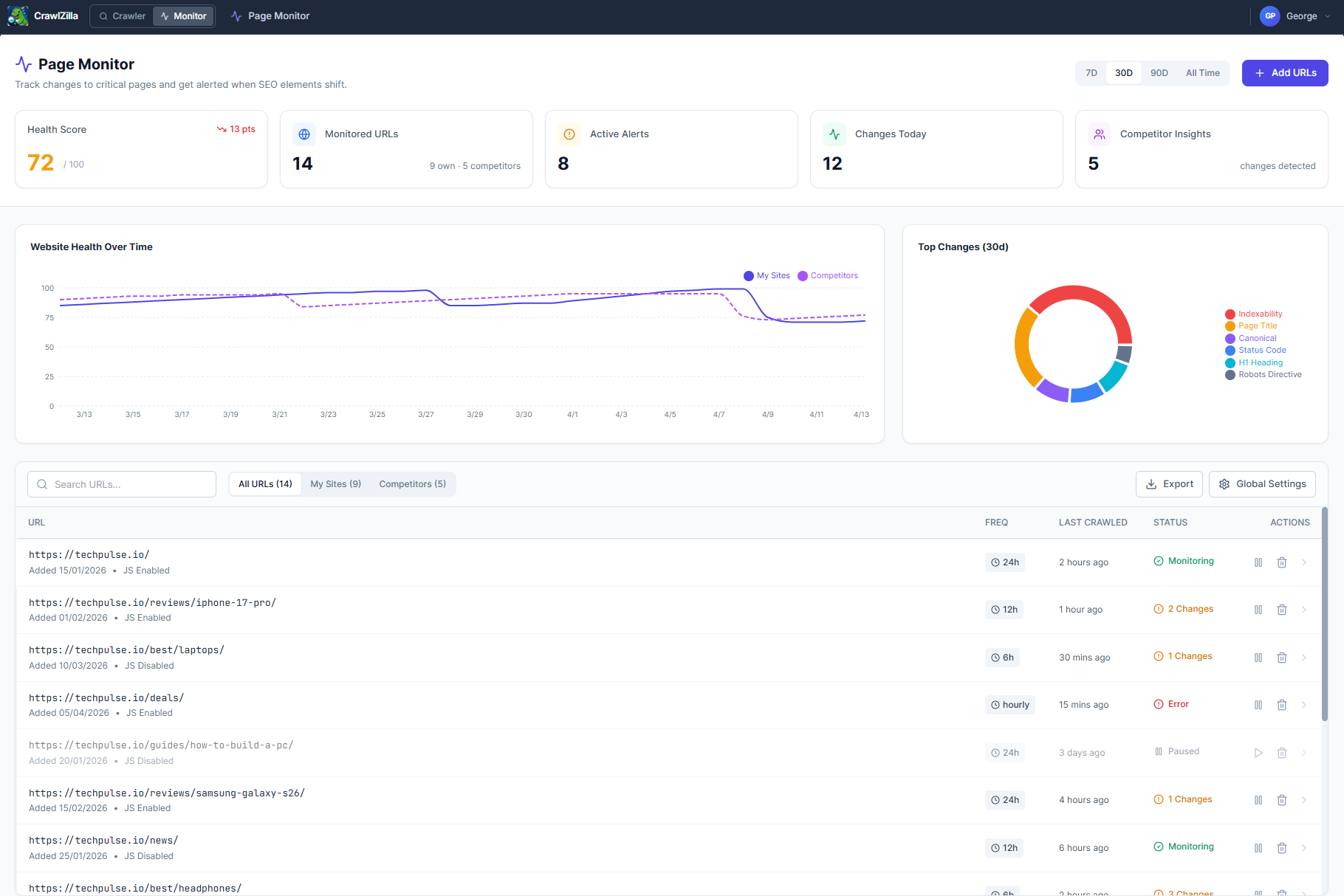
Automated change detection for your own pages and competitors'. Track titles, canonicals, indexability, status codes and more on a schedule — get alerted the moment anything changes.
Learn moreThree crawl modes — from 10K to 100M+ URLs
Spider mode follows every link from your seed URL, building a complete picture of your site's structure. Our distributed architecture scales horizontally to handle sites with over 100 million pages.
List mode crawls a specific set of URLs you provide — perfect for auditing a filtered export from Google Search Console or Analytics.
Subdomain mode extends spidering across all subdomains of your root domain — ideal for large enterprise sites.
40+ SEO data points per URL
Every URL is analysed for the full set of on-page signals that matter to search engines — from basic title tags to advanced structured data types, HTTP security headers, and hreflang implementation.
Filter any column, sort by any metric, and export exactly the slice of data you need. Share filtered views with clients or use them to prioritise your fix backlog.
Recrawl individual URLs or bulk fix
Found 400 broken pages? Filter to 4xx, select all with Ctrl+A, right-click and hit Recrawl all. After you've fixed them on the server, CrawlZilla re-verifies every URL and updates the table live.
Crawl JS-rendered sites the way Googlebot does
Millions of sites use React, Vue, Angular, or Next.js to render content client-side. Without a real browser, a standard crawler sees an empty shell — missing titles, missing content, missing links.
CrawlZilla's optional JS rendering mode spins up a headless Chromium instance for each URL, executes all JavaScript, waits for the page to settle, then analyses the fully-rendered DOM.
Performance, Accessibility & Core Web Vitals — built in
Every crawl automatically runs a real Google Lighthouse audit on your homepage. Switch to the Lighthouse tab to see Performance, Accessibility, Best Practices and SEO scores alongside all seven Core Web Vitals — LCP, FCP, CLS, TBT, SI, TTI, and TTFB.
Click "Audit page types" to automatically cluster your crawled URLs and audit one representative page from each pattern. Track scores across crawl sessions with sparkline trends to see whether your optimisations are working.
Continuous SEO monitoring, automatically
A one-time crawl tells you what's broken today. Page Monitor tells you what breaks tomorrow — and the day after. Add your most important URLs, set a monitoring schedule, and CrawlZilla checks them on repeat, flagging any SEO change the moment it's detected.
Monitor your own pages for regressions and your competitors' pages for strategic shifts. When their homepage title changes or their canonical setup shifts, you'll know before rankings move.
Start auditing your site today
Free plan includes 10,000 URLs. Scale to 100M+ without breaking the bank.
View pricing for higher URL limits, JS rendering, and Lighthouse audits.